 Resale Record
Check your 1099-K
Line up the Form 1099-K eBay sent you against your recorded sales, with editable assumptions and a list of the pieces that explain any difference.
If eBay sent you a Form 1099-K, you can line it up against your sales. This is informational only.
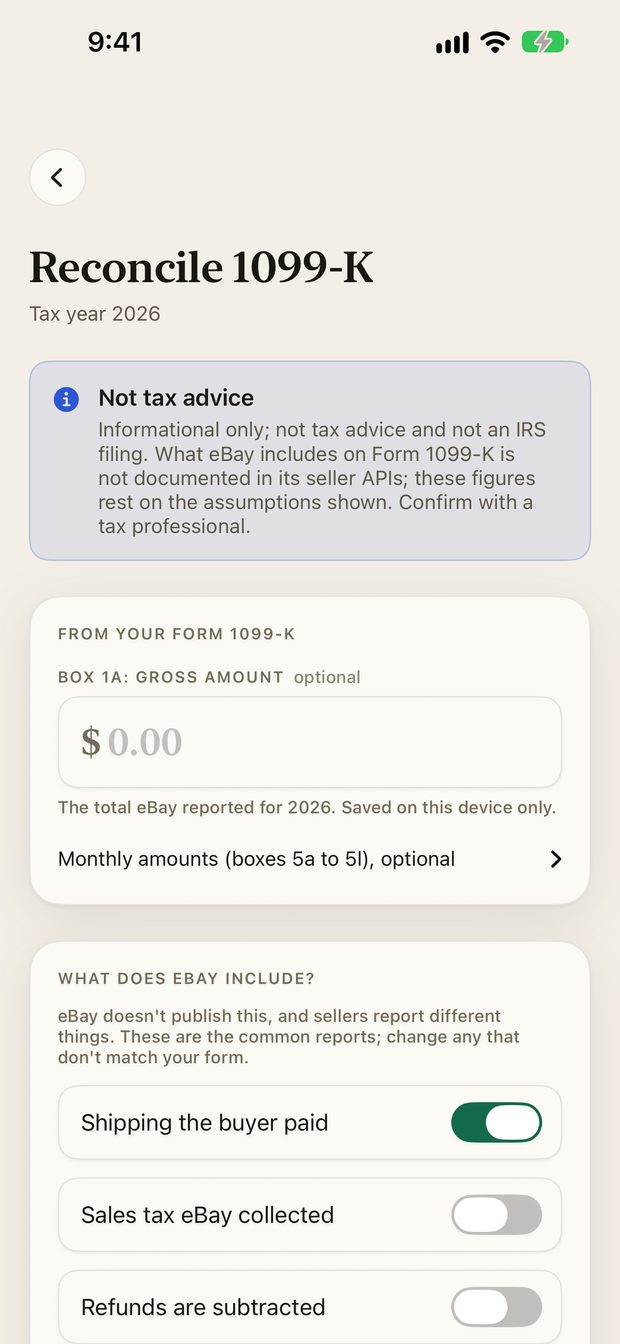
How to use it#
- Open Books and choose Reconcile 1099-K.
- Type in Box 1a (the gross amount). You can add the monthly boxes too. This is saved on your device only.
- Review the What does eBay include? switches, such as shipping the buyer paid, sales tax eBay collected and whether refunds are subtracted.
- Compare the estimate with your form, and read the list of pieces to explain any difference.
The app estimates what eBay would report from your recorded sales, using assumptions you can change.
For the background, read What your eBay 1099-K shows and Check your 1099-K against your recorded sales.
Something missing or out of date? Email [email protected] and tell us what you expected to see.